
Security Features:
Armed response and medical assistance via national service provider
OTP Verification
Stand alone alert app for drivers
OTP Verification
Dedicated tactical units deployed in high-risk areas to serve drivers
Ride Share
1. Armed response and medical assistance through Namola:
Emergency Assistance for Flash riders
Everything you need to know to use the Emergency SOS button inside the Safety Toolkit on the Flash rider app.
The Emergency SOS button allows Flash riders to send a real-time emergency alert to Namola’s national emergency response centre in the rare event of an emergency or incident whilst on a Flash trip. Once activated, the Flash vehicle’s make and model, license plate, live location and trip information will be shared with a dedicated Namola Response Centre operator who will co-ordinate emergency assistance on your behalf.
How it works
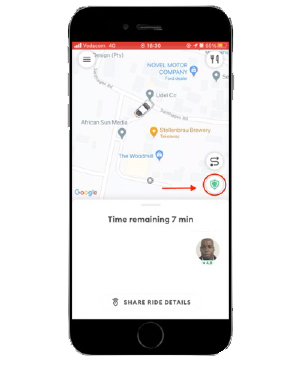
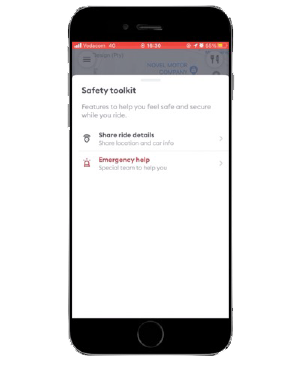
The Emergency SOS button is located in your rider “Safety Tool Kit”. To access the Safety Tool Kit:
Tap on the green shield icon at the bottom right of your Flash rider app.
Tap "Emergency help"
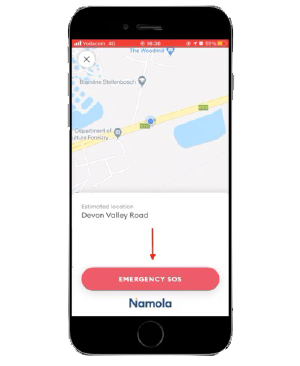
Pop up screen with a red Emergency SOS button. To send an emergency alert to the Namola control room tap Emergency SOS.
When prompted with "Request Emergency", tap "Continue".
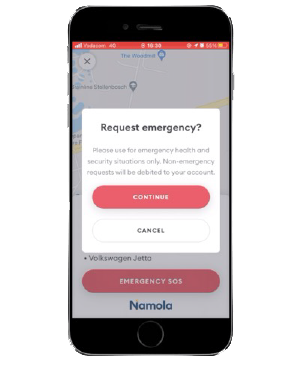
This will send an alert to the Namola control room.
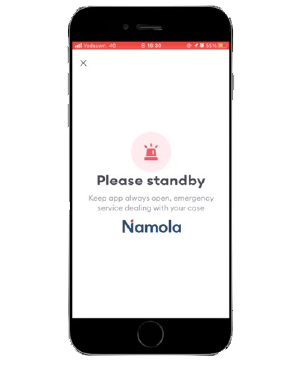
Please note: A Response Centre operator will call you to confirm your emergency. Answer your phone after pressing the Emergency SOS button
- If you are unable to talk, still answer the phone so that the operator can hear what is happening in the background
- If you are able to talk, please share details of your emergency with the operator. The operator will have the details of the vehicle that you are in, as well as the details of your trip. They will share this with the Armed Responder, whom they will dispatch to your location in the event of an emergency.
Tip: Unless you have given Flash access to your location "always" - keep your app open to ensure your location updates
What happens if I can't answer my phone after I have activated the Emergency SOS?
When should I press the Emergency SOS button?
Who will come and assist me in my emergency?
How long will it take for Armed Response to get to me in an emergency?
Will the SOS Emergency alert be activated if my driver goes off course?
Will the driver be alerted that I have sent an emergency alert when I push the SOS Emergency button?
I can't see the green shield icon on my rider app.
Your Safety Tool Kit (the green shield icon) will only appear when you are on a ride. If you are on a ride and cannot see the green shield icon, please contact Flash via the in-app support tab.
Please note that access to Armed Response in an emergency is only available whilst you are on a Flash trip if you would like to access Armed Response anywhere anytime, please download the Namola App and upgrade to Namola Plus
What if I feel unsafe while waiting for the driver can I still request assistance?
When I share my ride details, will my loved ones be able to request assistance on my behalf?
Sharing your trip location with your loved ones is a good idea and can be done easily through the Safety Tool Kit. However, your loved ones will not be able to automatically request assistance through the Flash app if they see you are off course. Make sure that you are paying attention to your surroundings and request help through the Emergency SOS button if you feel like you are in a threatening situation.
- OTP Verification:
– One time pin send to passenger before trip starts
– This pin needs to be verified by the driver to confirm the right pick up driver and vehicle - Ride Share:
– Let your loved ones know where you are in real time - Facial verification
– On drivers are screened and complete a background check before driving
– To make sure that driver is always in the right seat facial verification is completed every time he/she logs on to ensure passenger safety - Alert apps for drivers
– stand alone alert app for drivers to notify other nearby Flash drivers there require assistance - Dedicated tactical units deployed in high-risk areas
– Flash has its own armed tactical response teams that focus on high risk areas to exclusively serve Flash drivers